How it works
Three steps.
- 1
Sign in
With Apple or Google, or with a code that you approve on your phone. Your plan is there at once.
- 2
Tell it
Write what you need to do as one sentence. It shows the plan it would make before anything is saved.
- 3
See the day
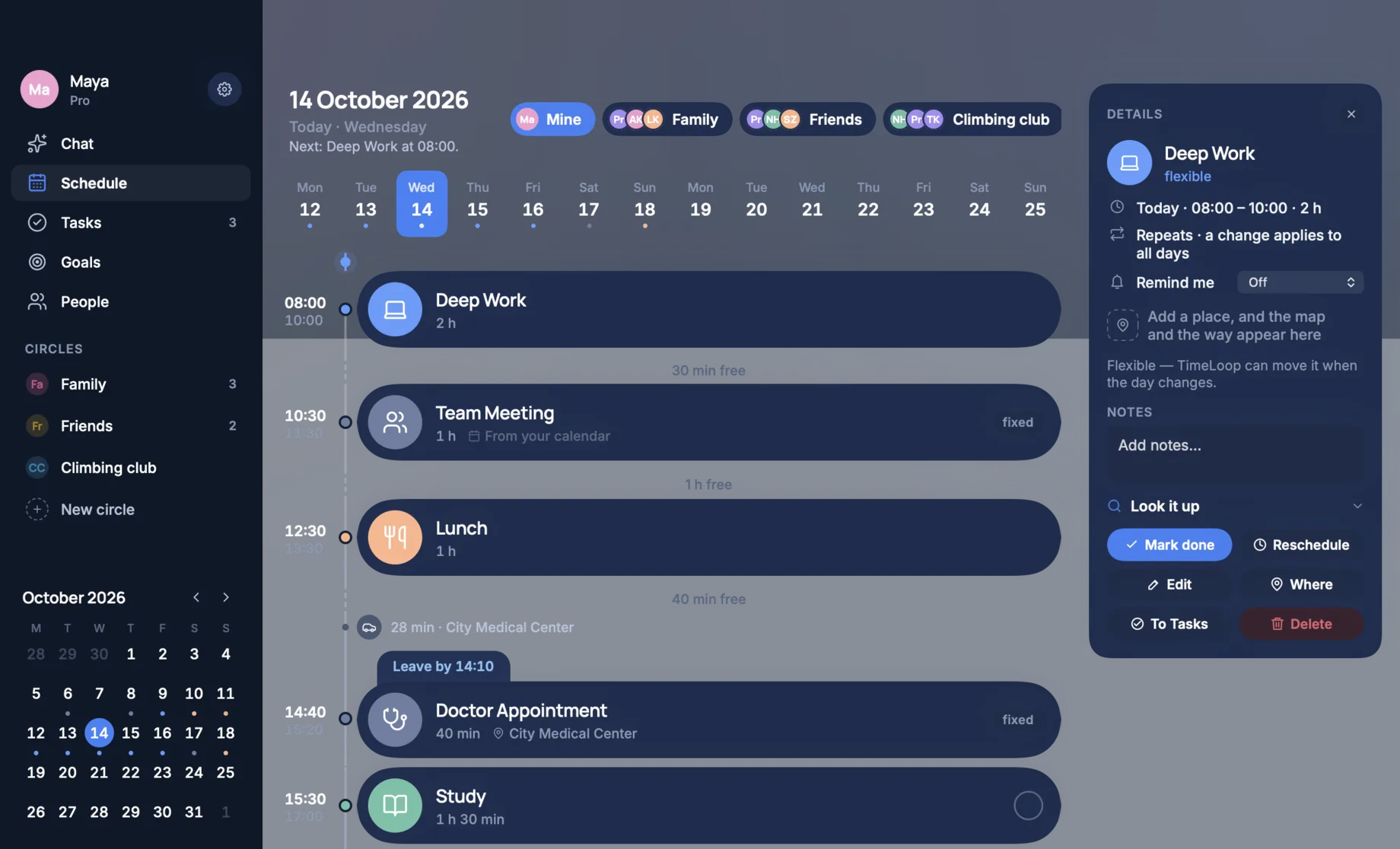
The day stands on its hours, with what is fixed and what can move. The week and the month are in the same window.
In detail
What it does for you.
Day, week and month
Three views of the same plan in one window, with a small month in the sidebar to jump with.
A sentence becomes a plan
Type the way you would say it. Planning from a sentence is part of TimeLoop Pro, as on the phone.
Fixed and flexible
What cannot move holds its place. What can is marked flexible, and TimeLoop may move it when the day changes.
Your circles beside it
Family and friends sit in the sidebar: pick a circle for its day and the list you share.
What is in the window
A sidebar with Chat, Schedule, Tasks, Goals and People, your circles and a small month. Beside it the plan: a day on its hours, a week side by side, or a month.
Click an event and its details open on the right: when it is, whether it is fixed or flexible, your notes, and buttons to mark it done, to move it or to look something up about it.
The same plan as your phone
TimeLoop keeps your plan on its server, so the Mac and the phone show the same day. What you add on one is on the other.
What your phone brings in from your calendars is part of that plan, so you see it on the Mac too.
Free and Pro
The Mac app follows your account. Seeing your day, adding and changing things by hand and your tasks are free. Planning from a sentence and the other things that do the work for you are part of TimeLoop Pro, and Pro on your account counts on the Mac as well.
When you can get it
TimeLoop for Mac is coming to the Mac App Store and is not there yet. It needs macOS 14 or later. Leave your e-mail on the front page and you get one message when it is out.
Questions
Asked before you asked.
Is there a TimeLoop app for Mac?
It is coming. TimeLoop for Mac is a native macOS app and is not in the Mac App Store yet.
Is it a web page in a window?
No. It is a native app made for macOS, with a sidebar, a panel in the menu bar, and light and dark.
Do I need the phone app to use it?
No. You can sign in on the Mac with Apple or Google. With the phone app you can also approve the Mac with a code.
Does it stay in step with my iPhone or Android phone?
Yes. The plan is kept on TimeLoop’s server, so every device signed in to your account shows the same day.
Is TimeLoop for Mac free?
It is free to plan with by hand. Planning from a sentence is part of TimeLoop Pro, which belongs to your account and counts on the Mac too.
Which macOS does it need?
macOS 14 or later.
Keep reading
Last updated 11 October 2026.
Your day, figured out.
Say what you need to do. See your life fall into place.