How it works
Three steps.
- 1
Add a task
Type it into “Add a task…”. It needs no day and no hour.
- 2
Open it
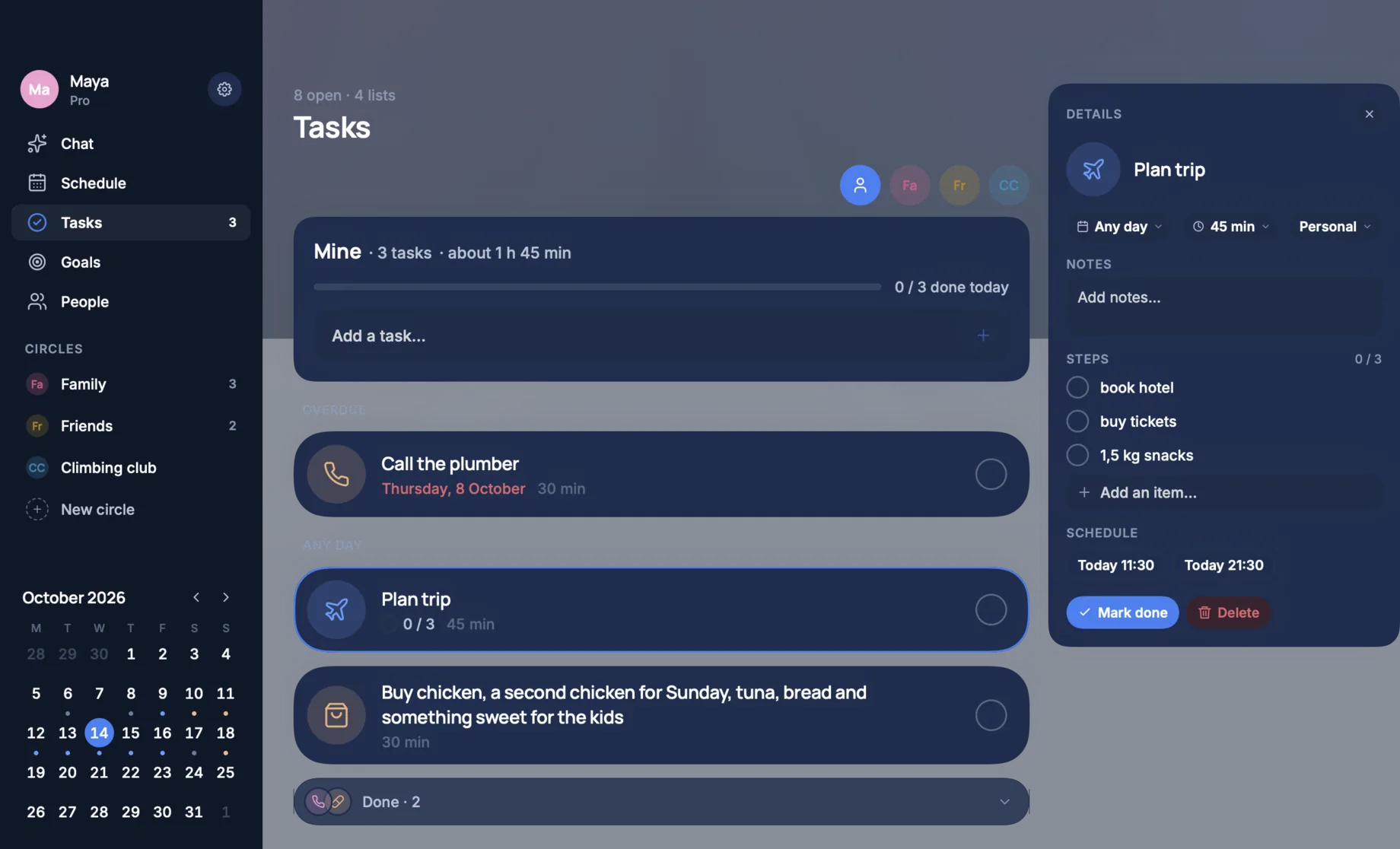
Its details open on the right: a day, how long it takes, its steps and a note.
- 3
Give it a time
TimeLoop offers free times from your plan. Pick one and the task is in your day.
In detail
What it does for you.
What is overdue, on top
Tasks are grouped by day: what is overdue first, then the ones for any day.
Steps and a note
A task holds a checklist of steps and a note, and shows how many of its steps are done.
Shared lists
Each of your circles has a list of its own beside yours, one click away.
A time from your plan
Free times are offered from the day as it is, so a task does not land on something fixed.
What a task holds
A name, and if you like a day, how long it takes, a kind, a note and steps. The steps are a checklist: tick them one by one and the task shows how far along it is.
Your list and the shared ones
Your own list is first. Beside it is one list for each circle you are in, for the things you do together, like the shopping.
Free and Pro
Tasks, their steps and shared lists are free on the Mac as on the phone. What needs TimeLoop Pro is planning from a sentence.
When you can get it
TimeLoop for Mac is coming to the Mac App Store and is not there yet. It needs macOS 14 or later. Leave your e-mail on the front page and you get one message when it is out.
Questions
Asked before you asked.
Does TimeLoop for Mac have a to-do list?
Yes. Tasks have a pane of their own in the window and a tab in the menu bar panel.
Can a task have subtasks?
Yes. A task holds steps, a checklist you tick one by one.
Can TimeLoop find a time for a task?
Yes. Open the task and it offers free times from your plan.
Can I share a list with my family?
Yes. Each circle has a shared list, on the Mac and on the phone.
Are tasks free?
Yes. Tasks, their steps and shared lists need no TimeLoop Pro.
When can I get it?
TimeLoop for Mac is not in the Mac App Store yet. It needs macOS 14 or later.
Keep reading
Last updated 11 October 2026.
Your day, figured out.
Say what you need to do. See your life fall into place.