How it works
Three steps.
- 1
Click the mark
TimeLoop’s mark sits in the menu bar. A click opens a small panel under it.
- 2
Read the day
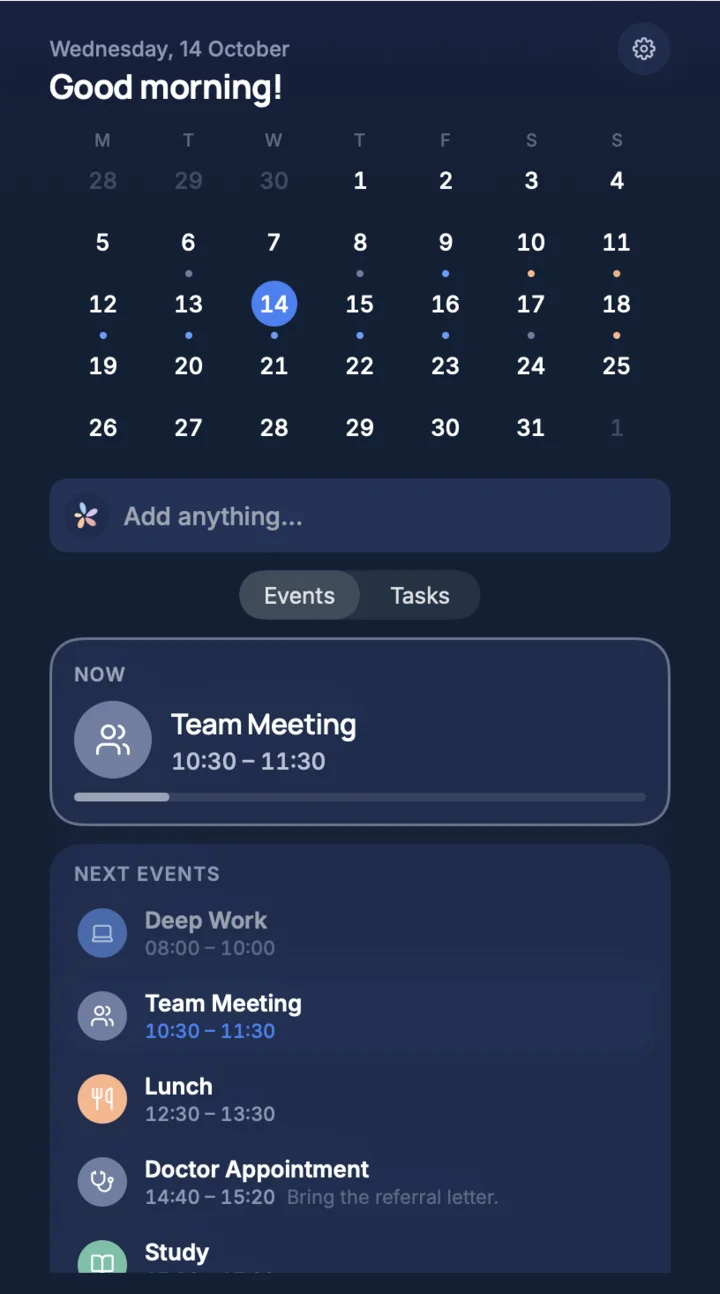
What is running now, with a bar for how far along it is, and the events after it in order.
- 3
Add or switch
Use “Add anything…” for something new, or switch from Events to Tasks. The full window is one click further.
In detail
What it does for you.
The month at a glance
The whole month with today marked, and a dot under each day that has something planned.
Now and next
The event that is running, with a bar for how far along it is, and the events after it with their hours.
Tasks in the same panel
Switch from Events to Tasks without leaving the panel.
A line for something new
“Add anything…” is where a new event or task starts. Planning from a sentence is part of TimeLoop Pro.
What the panel shows
From the top: the date and a greeting, the month, the line “Add anything…”, a switch between Events and Tasks, the event running now, and the events after it.
It is the same plan as in the window and on your phone. Nothing is kept in the panel alone.
Part of TimeLoop for Mac
The panel is not a separate app. It comes with TimeLoop for Mac, whose window holds the day, the week and the month, your tasks, your goals and your circles.
Free and Pro
Seeing what is running, what comes next, the month and your tasks is free. Planning from a sentence is part of TimeLoop Pro.
When you can get it
TimeLoop for Mac is coming to the Mac App Store and is not there yet. It needs macOS 14 or later. Leave your e-mail on the front page and you get one message when it is out.
Questions
Asked before you asked.
Does TimeLoop show my next event in the Mac menu bar?
Yes. The panel under TimeLoop’s mark shows the event running now and the events after it, each with its hours.
Can I see my tasks from the menu bar?
Yes. The panel switches between Events and Tasks.
Is the menu bar calendar a separate app?
No. It is part of TimeLoop for Mac, together with the full window.
Is it free?
Seeing your plan in the panel is free. Planning from a sentence is part of TimeLoop Pro.
When can I get it?
TimeLoop for Mac is not in the Mac App Store yet. It needs macOS 14 or later.
Keep reading
Last updated 11 October 2026.
Your day, figured out.
Say what you need to do. See your life fall into place.