“Doctor Thursday, gym three times,
six hours of study by Friday.”
Here’s what I understood
Build my day
“Gym three times this week.”
Gym × 3
per week
Fits this week“Dinner with the family this week.”
Thursday 19:30
Everyone free
“I’m running forty minutes late.”
You’re 40 min behind.
Lunch runs until 13:40.
Everything else stays as planned.
Every morning
For what matters
With your people
When the day slips
Your day, figured out.
An AI planner for your day, your tasks and your people. Say what you need to do.
One calm timeline for everything.
Your events, your tasks and the way there, on your phone and on your Mac.
Wednesday 7 October
Good afternoon, Emma!
EHow are you feeling?
Clean on purpose: no forms to fill in and no boards to sort. You say or type what you need to do.
Tell it. It plans. It adapts.
Tell it what you need to do. TimeLoop plans it, and plans again when the day changes.
Doctor on Thursday, gym three times, six hours of study before Friday.
Reading your note…Looking through your plan…Almost there…
Here’s what I understood
Build my day
Your day, figured out.
Wednesday 7 October · 4 planned · 2 fixed · 2 tasks
This week
October ⌄
7 October
Wednesday
Deep Work
Flexible — TimeLoop can move it when the day changes.
Work
08:00 → 10:00 2 h
Checklist 1/3
✓Outline the report
Charts for section two
Send draft to Maja
You’re 43 min behind.
Lunch moved 12:00 → 12:23.
Everything else stays as planned.
What do I have tomorrow?
Reading your note…Looking through your plan…Almost there…
Tomorrow
3 things planned
Move the dentist to Friday at 10
Reading your note…Looking through your plan…Almost there…
Dentist
Tomorrow · 15:00 → Fri 9 Oct · 10:00
Move to Fri 9 Oct · 10:00
Changed
Cancel the gym on Thursday
Reading your note…Looking through your plan…Almost there…
Gym
Thu 8 Oct · 17:30
Remove it
Removed
Your day.
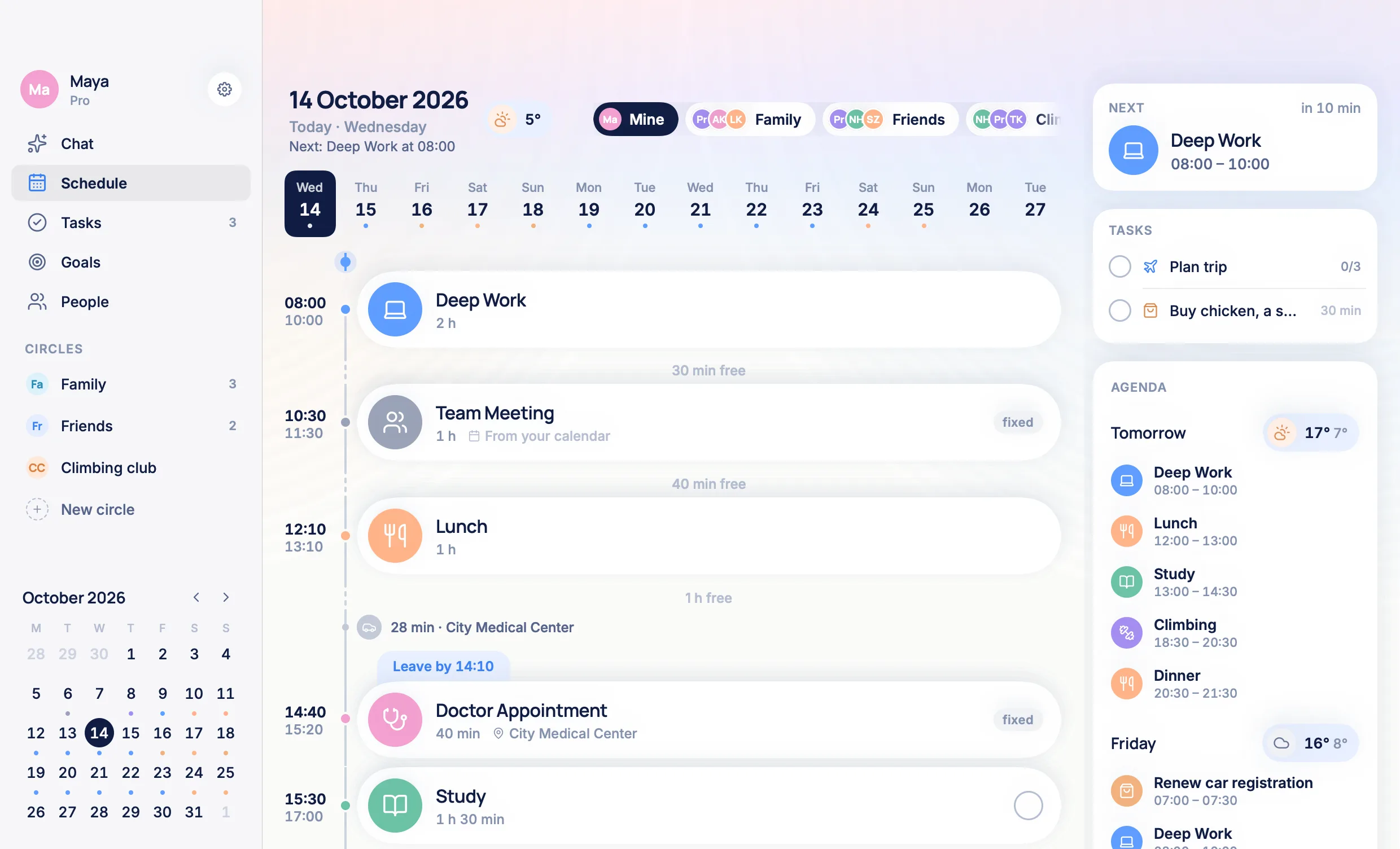
Now and what’s next, when to leave, what’s fixed and what can move.
- It can’t moveThe rest of the day is planned around it.
- Leave at 14:1028 min from where you are. The way is in your day.
- 12° and rainAt the health centre, when you get there.
- Parking is next doorYou asked once. The answer stays here.the city’s website
- Running 40 min late?Lunch moves. This stays.
2 tasks
LKMHEToday · 1
Anytime · 1
Done · 1
Good morning, Emma! You have 7 things planned today, including 2 fixed — Team Meeting at 10:30 and Doctor at 14:40. First up: Deep Work at 08:00. 2 tasks wait on your list. Your day is 56% full. Ready to begin?
Today: 8 h 10 minDone: 0/7Load: balanced
Is there parking nearby?
There is a public car park next to the health centre. Parking is paid on weekdays from 7:00 to 17:00.
ljubljana.si
And which bus goes there?
Bus 6 from the centre; the stop is two minutes from the door.
Your week.
Seven rings show how full each day is, and under them every event where it sits.
This week
October ⌄
Energy today
How are you feeling?
What weighs most
Lighten the day
A lighter day
Gym moves to tomorrow, 17:30.
Study stays: no other day has room.
Your week
On Today
Asked once a day
How are you feeling?
Answered, on a full day
Opened
A lighter day
Gym moves to tomorrow, 17:30.
Study stays: no other day has room.
Your cycle
Ovulation in
6 days
Day 9 of 28
Next period
31 Oct
Fertile window
12 – 17 Oct
Ovulation
17 Oct
Energy
Rising
Together.
Invite with one link. Propose a time. Yes, maybe or no.
Today · 7 October
Family ⌄
Coming up
Family dinner
Thu 8 Oct · 19:30 – 21:00 · Luka proposed
Find a time
Maja joined Family
One link. No codes, no accounts to set up.
On Today
Invitations
Opened
Design review
Fri 9 Oct · 10:00 – 10:45
Ana invited you
 Design reviewAna invited you · Fri 9. Oct, 10:00. Are you in?now
Family dinner and Training were proposed in a circle. Design review came through Google Calendar.
Before you keep the change
Thu 8 Oct
You’re 30 min behind.
Study runs until 19:30.
Everything else stays as planned.
What Luka and Maja get
Family dinnerEva is running about 15 min late.nowOnly if you switch it on. The switch is off until you do, and nothing is sent before you keep the plan.
The same plan on every screen.
Free to get. One account, and your day is on all of them.
With widgets on the Home Screen and the Lock Screen.
The same plan, with reminders that ring on time.
A window of its own and your next thing in the menu bar.
If you like, with Pro the watch or ring you already wear can suggest how you feel, on your phone only.
Start free. Go Pro when you are ready.
Free
Plan by hand.
No card, no end date.
Start free- The day on one timeline, with what is now and what is next
- Running late: the rest of the day planned again with a tap
- Tasks, and lists shared with other people
TimeLoop Pro
Have it done for you.
Billed yearly: €29.99 a year · US $24.99
Billed every month · US $3.99
Everything in Free, and:
- Planning from what you say or type
- Changing the plan by saying so
- When to leave, with the way measured from where you are
- The weather at the place, on every event that has one, and goals that stay out of the rain
- The morning brief
- As many goals and circles as you need
Pro also adds
- Telling the others when you run late: your circle, or a note on your answer in Google Calendar
- Look it up: answers from the web, kept with the event
On the App Store and at app.trytimeloop.com, the yearly plan starts with a free week for new subscribers. Everything in Free is included in Pro. Prices as of October 2026.
Questions,
answered.
What is TimeLoop?
TimeLoop is an AI day planner app for iPhone and Android. You say or type what you need to do, it places it around your fixed events, and you confirm the plan before anything is saved.
Is TimeLoop free?
Yes, to get and to plan with by hand: the timeline, tasks and shared lists, calendar sync and replanning a late day. TimeLoop Pro is a subscription for the parts that do the work for you, such as planning from a sentence.
How does the AI plan my day?
The language model only reads your words and turns them into things to do, with their lengths, deadlines and fixed times. The hours are chosen by rules, around your fixed events and inside your waking and working hours, and the same words always give the same day.
Does TimeLoop work with Google Calendar and Apple Calendar?
Yes, both ways, and it is free. Your events come in as fixed. In Apple Calendar your plan goes out to a calendar named “TimeLoop”; in Google Calendar the events you give guests or a Meet link go out. Outlook and Exchange are read on an iPhone through the phone’s calendar; there is no direct Microsoft connection.
What happens when I am running late?
Say how late you are, or tap. TimeLoop moves what can move, keeps fixed events and the way to them, shows you before and after, and lets you undo.
Which languages can I use?
Typing works in any language. Speaking works in the languages your phone takes dictation in: English, German, French, Spanish, Italian and about thirty more. Slovenian is typed. The app itself is in English and Slovenian.
Can I plan with my family or friends?
Yes. Make a circle and send its link; there are no codes to type and your contacts are not uploaded. The circle shows when everyone is free, anyone can propose a time, and it has a shared list. iPhone and Android work together.
Is my plan private?
Your plan is kept on TimeLoop’s own server in Germany. Nothing is sold, there are no ads, and you can delete your account and everything in it from the app at any time.
Apple CalendarBoth ways
Your events come in as fixed. Your plan goes out to a “TimeLoop” calendar and stays up to date.
iCloud RemindersBoth ways
Reminders come in and get a time; “done” goes back.
Google CalendarBoth ways
Your events come in with their video links and guests. Events you give a Meet link or guests go out to Google and follow every change. Invitations are answered here, and Google tells whoever invited you.
Outlook and ExchangeNot connected
There is no Microsoft connection. An Outlook or Exchange account added to an iPhone’s calendar is read with the rest of that calendar.
Works with
- Apple CalendariPhone
- Google CalendariPhone and Android
- iCloud RemindersiPhone
TimeLoop has completed Google’s OAuth verification for its access to Google Calendar. What it reads and writes